If your garbage disposal stops working, it does not always mean it needs to be replaced. Many units have a built-in reset button that can restore operation in just a few minutes.
Understanding how to safely reset your garbage disposal and what to check beforehand can help you avoid unnecessary repairs.
Why garbage disposals stop working
Garbage disposals are designed with a safety feature that shuts the unit off when it becomes overloaded or overheated. This prevents damage to the motor and internal components.
When this happens, the reset button is triggered and must be pressed to restore power.
Common causes include
- Food buildup or blockage inside the unit
- Overheating from extended use
- Hard objects jamming the blades
- Electrical interruption or overload
Step-by-step: How to reset a garbage disposal
Before resetting your disposal, make sure it is safe to do so and that the unit is turned off.
Follow these steps
-
Turn off the power
Unplug the disposal or switch off the circuit breaker to ensure safety. -
Check for visible blockages
Look inside the disposal using a flashlight. Never use your hands to remove debris. -
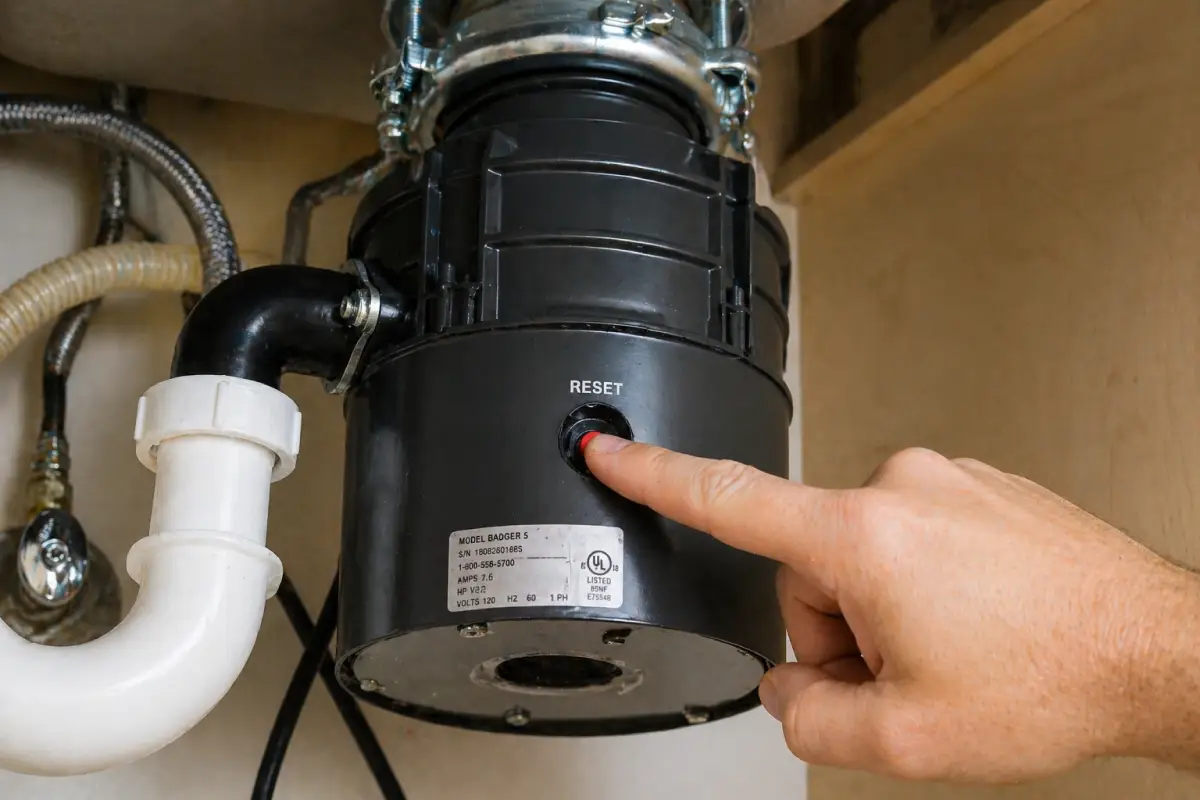
Locate the reset button
The reset button is typically found on the bottom or side of the unit and is often red. -
Press the reset button
Firmly press the button until it clicks into place. -
Restore power and test
Turn the power back on and run water before testing the disposal.
What to do if the reset does not work
If the garbage disposal still does not turn on after resetting, there may be a deeper issue. This could include a jammed motor, electrical problem, or worn internal components.
In some cases, additional troubleshooting may be needed before the unit will function properly again.
Additional things to check
- Make sure the unit is receiving power
- Check if the disposal is humming but not spinning
- Look for signs of a jam or obstruction
- Confirm the circuit breaker has not tripped
Safety tips when resetting a disposal
Garbage disposals contain sharp components and should always be handled carefully. Taking proper safety precautions can help prevent injury.
- Never put your hand inside the disposal
- Always disconnect power before inspecting the unit
- Use tools designed for clearing jams if needed
- Avoid forcing the unit if it is stuck
When to call a professional
If your garbage disposal continues to have issues after resetting, it may require professional repair or replacement. Persistent problems can indicate motor failure or internal damage.
Getting the unit inspected can help prevent further issues and ensure it operates safely.
Final Thoughts
Resetting a garbage disposal is often a quick and simple fix for common issues. Knowing how to safely reset the unit can help you restore operation without unnecessary repairs.
If the problem continues, having it checked can ensure your system is working properly again.